The wrong question is: which AI tool can do everything?
If someone asks me which AI tool matters most to me, the short answer today is the ChatGPT app. The more precise answer is more nuanced. ChatGPT is the command centre of my AI tech stack, but I deliberately do not use it as the only tool or expect it to handle every task itself.
The market likes to tell the story of one assistant that takes over every knowledge, writing, analysis, and coding task. That is not the right architecture for my day-to-day work. A coding agent works in a different context from an assistant for Microsoft 365 documents. A tracing system answers different questions from a traffic analytics tool. An issue tracker serves a different purpose from a personal knowledge system.
I could try to hide those differences behind one chat window. But the domain boundaries would not disappear. I would still need to know which source supports an answer, which system performs an action, and where an outcome can be verified. So the better question for me is: which roles does my work system need, and which tool fulfils each role in a traceable way?
A central workspace coordinates the work. Specialist tools remain in use where they serve a clear purpose.
The ChatGPT app as the command centre
The ChatGPT app is my central point of entry. It brings together context, tasks, and connections to other work systems. I complement it with an LLM wiki based on the pattern described by Andrej Karpathy.
This wiki matters more to me than an ever-longer individual prompt. It keeps relevant connections available over time: ways of working, projects, rules, existing decisions, and recurring processes. That means I do not have to start from zero with every new task.
Calling it a command centre does not mean ChatGPT carries out every action autonomously. It describes its organisational role. This is where I formulate goals, connect information, and decide what the next sensible step is. Depending on the task, the actual execution remains in a specialised system.
My stack by function
The following allocation describes how I use these tools as of 19 August 2026. It is not a general product ranking; individual roles can shift as capabilities and workflows change.
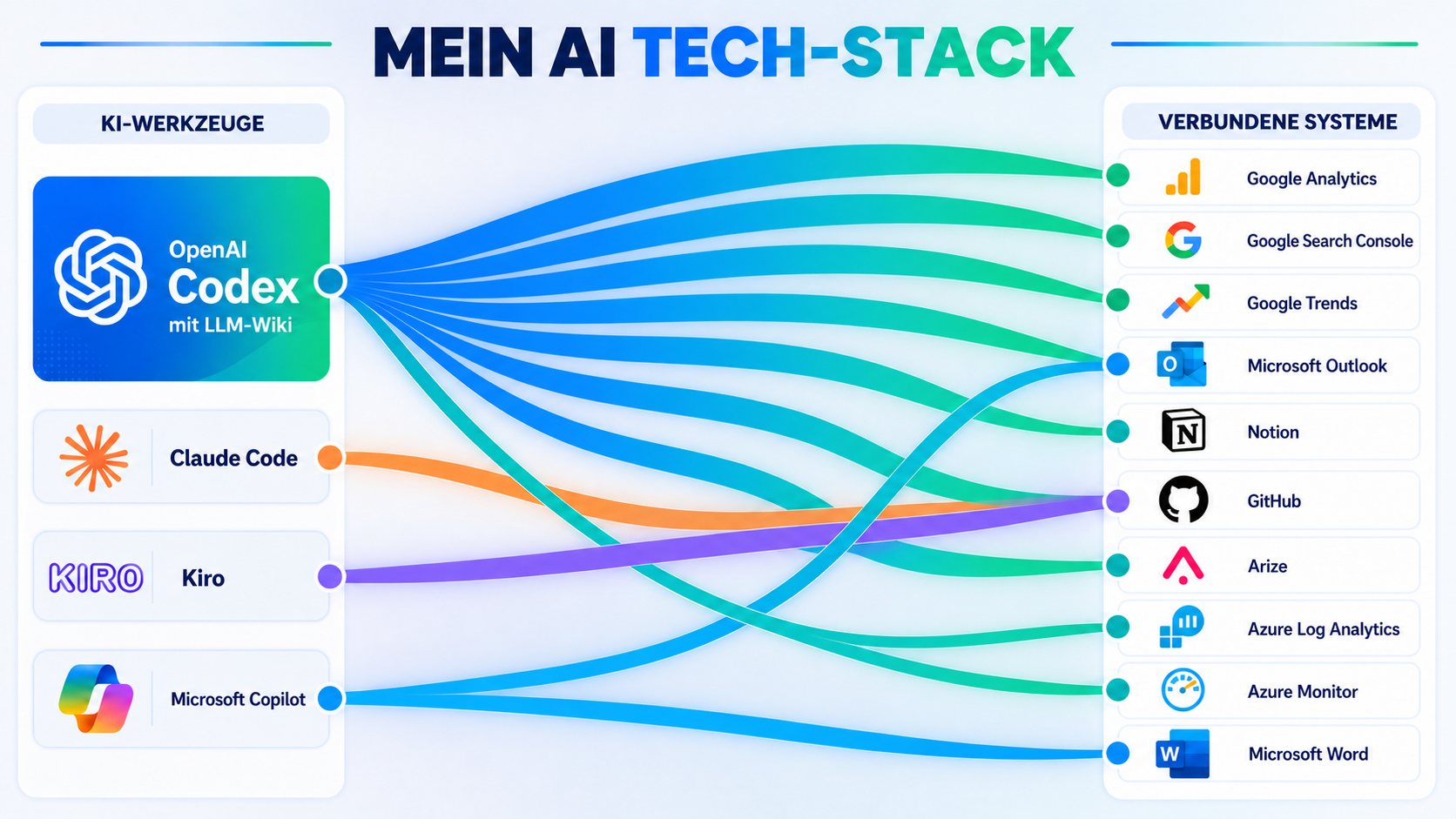
- Command centre: The ChatGPT app brings together context, structures tasks, and coordinates work.
- Persistent context: An LLM wiki keeps rules, projects, decisions, and recurring processes available.
- Work and knowledge: GitHub manages development tasks, Notion captures ideas and working notes, and Daily Tasks prepares briefings and structures task execution.
- Information search and documents: Microsoft Copilot helps me find information in the work context and edit documents.
- Coding: Claude Code, Codex, and Kiro investigate, change, and verify software tasks.
- Feedback: Arize analyses agent and model runs, Azure Log Analytics technical operational signals, and Google Search Console plus Google Analytics search and website data.
Three layers instead of a tool list
The individual products matter less than the three layers they form together: context and coordination, specialised execution, and feedback from operations and usage.
At the first layer, the command centre and the LLM wiki preserve what matters. They connect current tasks with existing knowledge and decisions that have already been made. Without this layer, every interaction remains an isolated request: an assistant may produce a good answer, but it does not understand the longer-term context.
The second layer is specialised execution. Coding, document work, and task management require different tools and permissions. An agent needs to inspect repositories, prepare changes, and verify results. Microsoft Copilot, by contrast, belongs where Microsoft 365 information and documents are central.
The third layer provides feedback. Arize helps me analyse traces, Azure Log Analytics provides a view of system health, and Google's tools make it visible how content is discovered and used through search and the website. This lets me check not just the output, but also the process, system health, and impact.
Why I use three coding tools
Claude Code, Codex, and Kiro sit alongside one another in my architecture. At first glance, that can look redundant. In fact, some of that redundancy is intentional.
Coding tasks vary greatly. Some need a quick change in a clearly scoped repository. Others require substantial context, several review cycles, or a second perspective. Models, agent harnesses, and interaction concepts also evolve quickly.
I therefore do not want to tie my way of working entirely to a single coding tool. What matters to me is the specification, the project context the tool can access, the tools available to it, and the quality of the feedback loop. The specific agent is an important component, but it is not the entire architecture. I describe this idea in more detail in From chatbot to agent harness.
That does not mean three tools make sense for every team. More choice also creates more maintenance. For my current workflow, the flexibility of clear role allocation is more valuable than reducing everything to one vendor.
AI fluency does not come from a tool list
A stack of many products is not yet a good work system. More important is that people learn to work with AI effectively. The AI Fluency Framework by Rick Dakan and Joseph Feller describes four connected capabilities.
- Delegation: deciding which task AI should take on and what remains with people.
- Description: describing the goal, context, and quality criteria clearly enough for AI to work effectively.
- Discernment: critically evaluating both the result and the approach instead of accepting the first output without review.
- Diligence: taking responsibility for data, permissions, approvals, and the consequences of an action.
These capabilities matter more than which tool is receiving the most attention at any given moment. They help people understand a tool's role, select suitable tasks, and judge the quality of results.
Start with one workflow and expand step by step
No one needs a complete AI tech stack at the start. A better starting point is a clearly defined, recurring workflow with manageable risk: structuring information for a client meeting, preparing a first draft of a document, or analysing a development task.
With that one workflow, it becomes practical to learn: what should I delegate? What context and criteria do I need to provide? How do I verify the outcome? Where are the boundaries for data and approvals?
Only once that workflow works reliably is the next step worthwhile. Perhaps a maintained knowledge base is added, a specialist tool for coding or document work, or a recurring sub-step is automated while retaining clear human control. This lets the stack and the way of working grow together, rather than a company first purchasing many licences and only then looking for suitable tasks.
My own stack has developed this way and remains open to change. Not every team needs the same tools. What matters is starting with concrete work, building competence from it, and adding the next component only when it provides clear value.
My current conclusion
ChatGPT is the command centre of my AI tech stack. Its productive value, however, comes from working together with the LLM wiki and the specialist tools around it.
GitHub and Notion structure work and knowledge. Microsoft Copilot handles tasks in the Microsoft 365 context. Claude Code, Codex, and Kiro form the coding layer. Arize, Azure Log Analytics, Google Search Console, and Google Analytics provide feedback from agent runs, operations, and usage. Daily Tasks connects this information to my workday.
I am therefore not looking for a super-agent that replaces everything. I am building a work system in which every tool has a traceable role and outcomes feed back into the next decision.
Not every team needs the same tools. It needs an initial controllable workflow whose value can be verified.